Customer Behavior vs. Customer Feedback: Key Differences and Why They Matter
 Thu Nghiem
Customer feedback reveals what users say they want, while customer behavior shows what they actually do. Learn the key differences, why both matter, and how to combine them for smarter decision-making.
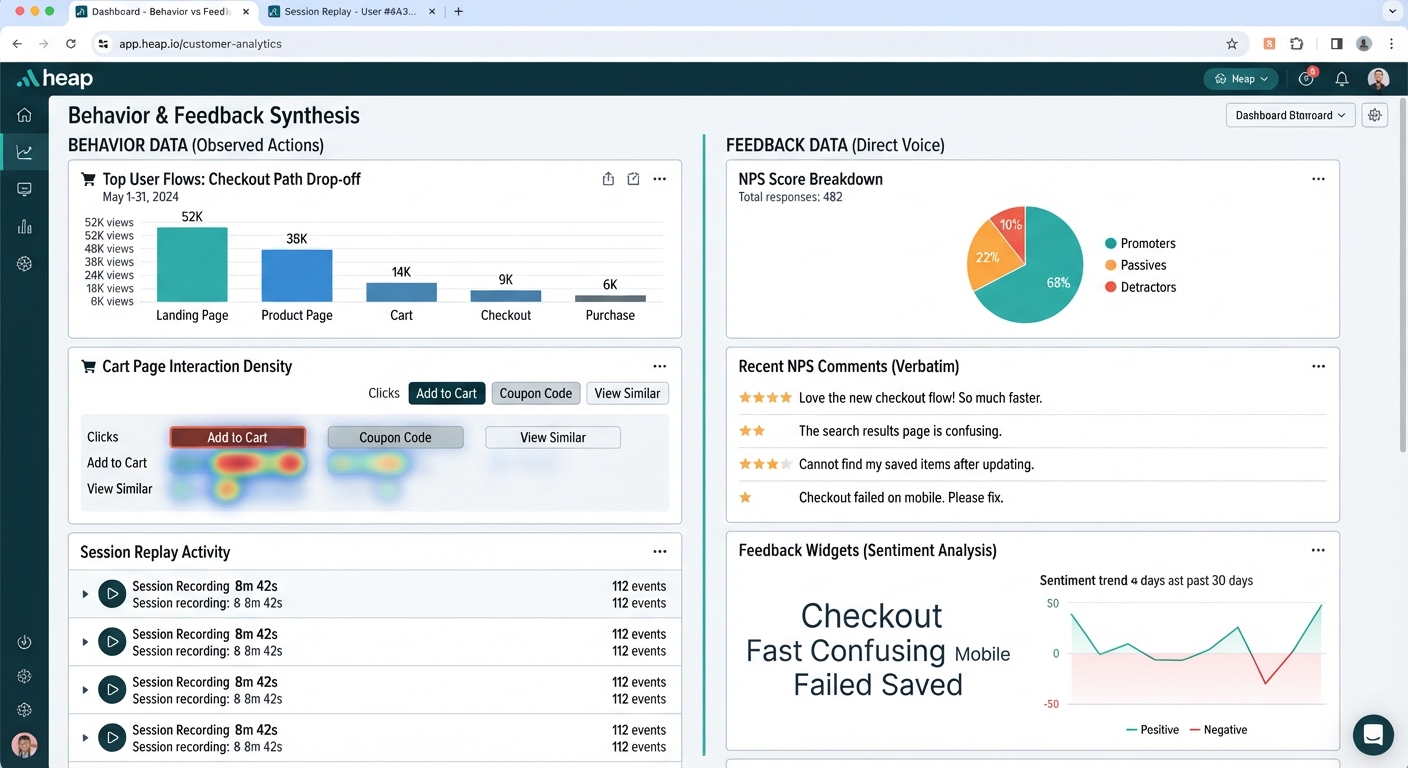
You’ve heard the phrases before: "Listen to your customers" and "Watch what they do." But what happens when those two pieces of advice point in different directions?
Customer feedback tells you what people say they want. Customer behavior shows you what they actually do. One is a conversation; the other is a silent record of actions. Both are critical—but they serve different purposes, and relying on just one leaves gaps in your understanding.
In this guide, we’ll break down the key differences between customer behavior and feedback, why both matter, and how to use them together to make smarter decisions.
What Is Customer Behavior? (And Why It’s Powerful)
Customer behavior refers to the observable actions people take when interacting with your product, website, or brand. This includes clicks, purchases, time spent on a page, feature usage, churn, and even passive behaviors like scrolling or hovering.
How It’s Tracked
Behavioral data is collected through tools that record user activity in real time:
- Analytics platforms (Google Analytics, Mixpanel, Amplitude) track metrics like page views, drop-off rates, and conversion funnels.
- Heatmaps and session recordings (Hotjar, FullStory) show where users click, how far they scroll, and where they hesitate.
- CRM and transactional data (Salesforce, Shopify) log purchases, returns, and support interactions.
- Product analytics (Pendo, Heap) monitor feature adoption, session duration, and user paths.
Why It’s Valuable
Behavioral data is:
- Unbiased: It reflects what users do, not what they say they do.
- Real-time: You see actions as they happen, not after the fact.
- Scalable: You can track thousands of users without manual input.
- Revealing: It uncovers patterns that users might not even notice (e.g., a confusing checkout flow).
Example: A user adds items to their cart but abandons it at the shipping step. Behavior data shows where they left—but not why. Was it the cost? The delivery time? The lack of payment options? The data alone can’t tell you.
What Is Customer Feedback? (And Its Limitations)
Customer feedback is direct input from users about their experiences, preferences, and pain points. It comes in many forms:
- Surveys (NPS, CSAT, post-purchase questionnaires)
- Reviews (app stores, Google, Trustpilot)
- Interviews and focus groups (qualitative deep dives)
- Support tickets and live chat (real-time complaints or questions)
- Social media and community forums (unsolicited opinions)
How It’s Collected
Feedback is gathered through:
- Survey tools (Typeform, SurveyMonkey, Delighted)
- Feedback widgets (Usabilla, Qualaroo)
- Customer support platforms (Zendesk, Intercom)
- Voice of Customer (VoC) programs (Medallia, Qualtrics)
Why It’s Valuable
Feedback provides:
- Intent: Why users do what they do.
- Emotional context: How they feel about their experience.
- Ideas for improvement: Direct suggestions from the source.
The Limitations
Feedback isn’t perfect. It’s prone to:
- Bias: Only the most vocal (or dissatisfied) customers respond.
- Memory gaps: Users might misremember details or generalize experiences.
- Social desirability bias: People say what they think you want to hear (e.g., "I love this feature!" when they never use it).
- Low response rates: Even well-designed surveys often get <10% participation.
Example: A post-purchase survey shows 90% of users "love" a new feature. But behavioral data reveals that only 5% of users actually engage with it. The feedback was positive—but misleading.
Key Differences: Behavior vs. Feedback at a Glance
| Aspect | Customer Behavior | Customer Feedback |
|---|---|---|
| Source | Actions (clicks, purchases, time spent) | Words (surveys, reviews, interviews) |
| Timing | Real-time (as it happens) | Retrospective (after the fact) |
| Scale | Quantitative (large datasets) | Qualitative (smaller, deeper insights) |
| Reliability | Objective (what users do) | Subjective (what users say) |
| Bias | Low (passive tracking) | High (self-reported) |
| Best for | Optimization, A/B testing, funnel analysis | Ideation, understanding emotions, pain points |
| Example Use Case | Identifying where users drop off in checkout | Learning why users abandon carts |
How to Use Both Together (Practical Examples)
Neither behavior nor feedback tells the full story alone. Here’s how to combine them for clearer insights:
Scenario 1: Low Feature Adoption
- Behavior: Analytics show users rarely click on a new feature.
- Feedback: A survey reveals users don’t understand its purpose.
- Action: Redesign the onboarding flow to explain the feature’s value, then add tooltips for clarity.
Scenario 2: High Cart Abandonment
- Behavior: Session recordings show users exiting at the shipping step.
- Feedback: A pop-up survey reveals unexpected costs as the top reason.
- Action: Display shipping fees earlier in the checkout process or offer free shipping thresholds.
Scenario 3: Declining NPS
- Behavior: Engagement metrics (session duration, repeat visits) are dropping.
- Feedback: Support tickets highlight slow load times as a frustration.
- Action: Prioritize performance optimizations and communicate fixes to users.
Common Mistakes to Avoid
1. Relying Solely on Feedback
Problem: Feedback comes from a vocal minority. The silent majority—who don’t respond to surveys—might behave differently. Fix: Use behavior data to validate (or challenge) feedback. If 80% of users ignore a feature, but 10% of survey respondents say they love it, dig deeper.
2. Misinterpreting Behavior Without Context
Problem: Assuming low clicks = disinterest. Maybe users want to engage but can’t find the feature. Fix: Pair behavior data with feedback to uncover the "why." For example, heatmaps might show users hovering over a button but not clicking—suggesting confusion, not disinterest.
3. Over-Surveying Customers
Problem: Bombarding users with surveys leads to fatigue and low response rates. Fix:
- Use micro-surveys (1-2 questions) at key moments (e.g., post-purchase).
- Target specific segments (e.g., only users who abandoned carts).
- Offer incentives (e.g., discounts, early access) for participation.
4. Not Closing the Loop
Problem: Collecting feedback but never acting on it (or communicating changes). Fix:
- Share updates: "You asked for faster load times—here’s what we did."
- Show impact: "Your feedback led to X change, which improved Y metric."
- Follow up: Re-survey users after changes to measure satisfaction.
Tools to Track Behavior and Feedback
Behavior Tracking Tools
| Tool | Best For | Key Features |
|---|---|---|
| Google Analytics | Website traffic, funnel analysis | Free, integrates with Ads, custom reports |
| Hotjar | Heatmaps, session recordings | Visual behavior insights, feedback polls |
| Mixpanel | Product analytics, user journeys | Event-based tracking, retention analysis |
| Amplitude | Advanced behavioral analytics | Predictive insights, cohort analysis |
| FullStory | Session replay, error tracking | Frustration signals (rage clicks) |
Feedback Collection Tools
| Tool | Best For | Key Features |
|---|---|---|
| Typeform | Interactive surveys | Conversational format, conditional logic |
| SurveyMonkey | General-purpose surveys | Templates, NPS/CSAT scoring |
| Delighted | Post-interaction feedback | One-click surveys, Slack integration |
| Medallia | Enterprise VoC programs | AI-driven sentiment analysis |
| Usabilla | In-app feedback | Targeted surveys, visual feedback |
Integrated Platforms (Behavior + Feedback)
- HubSpot: Combines CRM, behavior tracking, and feedback tools.
- Qualtrics: Advanced survey capabilities with behavioral data integration.
- Pendo: Product analytics + in-app feedback and guides.
Pro Tip: Look for tools with native integrations (e.g., Hotjar + SurveyMonkey) to merge datasets in one dashboard.
Next Steps: How to Get Started
1. Audit Your Current Data
- What’s missing? Do you have behavior data but no feedback? Or vice versa?
- Where are the gaps? For example, if you track purchases but not feature usage, you’re missing key insights.
2. Set Up Tracking for Key Behaviors
- Prioritize critical paths: Onboarding, checkout, feature adoption.
- Use tools like Hotjar or Mixpanel to record user sessions and identify drop-off points.
3. Design Lightweight Feedback Loops
- Micro-surveys: Ask 1-2 questions post-interaction (e.g., "What almost stopped you from completing your purchase?").
- Targeted prompts: Trigger surveys based on behavior (e.g., after a user abandons cart).
- Leverage existing channels: Mine support tickets and reviews for unsolicited feedback.
4. Analyze Both Datasets Together
- Monthly insights review: Compare behavior trends (e.g., declining engagement) with feedback themes (e.g., complaints about speed).
- Look for discrepancies: If feedback says users love a feature but behavior shows low usage, investigate why.
5. Close the Loop
- Communicate changes: Share how customer input led to improvements (e.g., "You asked for X, so we built Y").
- Measure impact: Track whether changes improved behavior metrics (e.g., higher feature adoption).
The Bottom Line
Customer behavior and feedback are two sides of the same coin. Behavior tells you what users do; feedback explains why they do it. Together, they give you the full picture—helping you make decisions that are both data-driven and human-centered.
Key Takeaways:
- Behavior is objective but silent—it shows actions, not intent.
- Feedback is subjective but vocal—it explains the "why" but can be biased.
- Combine both to validate assumptions, uncover hidden pain points, and prioritize improvements.
- Avoid common pitfalls like over-surveying or misinterpreting behavior without context.
- Use the right tools to track, analyze, and act on insights efficiently.
Start small: Pick one key behavior (e.g., cart abandonment) and one feedback channel (e.g., a post-purchase survey). See how the two datasets complement each other—and let that guide your next move.